Plexi Drive Instructions
← Back to product pageBuild Difficulty: Multimeter Required
Components
| C1 | 220nF |
| C2 | 47pF |
| C3 | 470pF |
| C4 | 220pF |
| C5 | 2n2 |
| C6 | 22nF |
| C7 | 47uF Electrolytic |
| C8 | 1uF Film/Monolithic Ceramic |
| C9 | 2n2 |
| C10 | 10nF |
| C11 | 100uF Electrolytic |
| R1 | 1M |
| R2 | 1M |
| R3 | 1K |
| R4 | 1K |
| R5 | 1K |
| R6 | 10K |
| R7 | 100K |
| R8 | 1K |
| R9 | 15K |
| R10 | 15K |
| R11 | 10R |
| D1 | 1N4001 |
| Q1 | MMBFJ201 |
| Q2 | MMBFJ201 |
| Q3 | MMBFJ201 |
| VOL | 100K Log |
| BASS | SPDT |
| GAIN | 500K Log |
| TONE | 25K Log |
| Q1BIAS | 50K Trimmer |
| Q2BIAS | 50K Trimmer |
| Q3BIAS | 50K Trimmer |
Build Notes
This board has space for either SMD JFETS (MMBFJ201) or through hole J201, you only need to use one type, not both. Through hole JFETs are getting more expensive and harder to find, and a lot of them are fakes that don't work well so if you are comfortable soldering surface mount components I would suggest using them. The switch is for an optional bass boost and is not required if you don't want to use it. In order to get the circuit sounding good, you will need to bias the JFETs once you finish soldering everything. To do this, connect the 9V and ground wires to your power supply and use a multimeter to measure the voltage between ground and the test points on the PCB labeled T1 to T3. You need to turn the trimmers until the voltage is around 5V. You can try different bias voltages if you want, but this is the standard value.
Board Connections
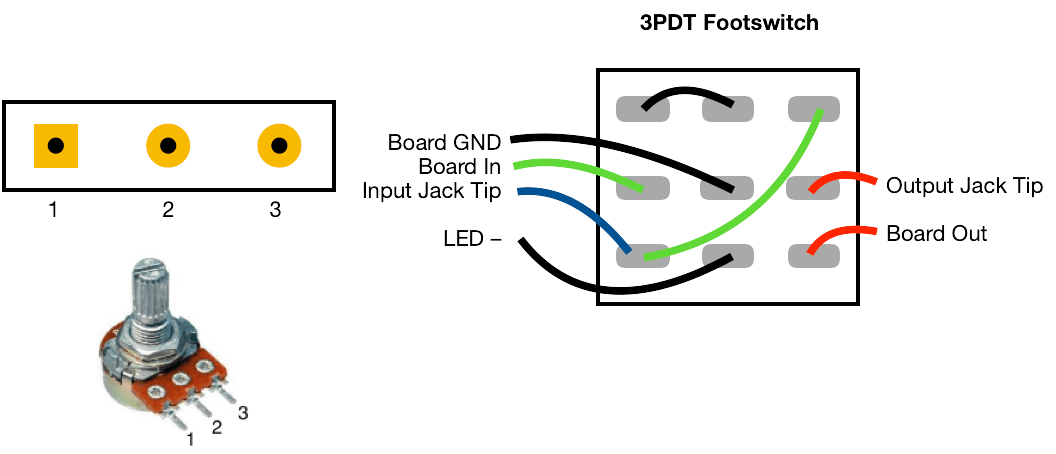
The PCB connections are labelled as the following: I - Input, O - Output, V - 9V DC in, G - Ground Potentiometers are connected from pin 1 to the square pad on the PCB.
This board was designed so you can use right-angle board mount potentiometers on it if desired, otherwise you will need to solder wired from the pads to the correct pin/lug.
Jack sleeves and DC centre pin should be connected to ground. V, LED + with a 2K2 resistor in series should be connected to the positive pin of the DC connector.